


Page 141 - UNI 101 Computer Science Handout.
P. 141
Faculty of Nursing
                                                                  Adult care Nursing Department


              Select your desired font from the list that appears.

              Changing the Effects of a Theme

              In order to alter the visual effects of an applied theme:
              1)     From the Variants group, click the down arrow with the line above it, in the bottom right corner

             (See Figure 21).

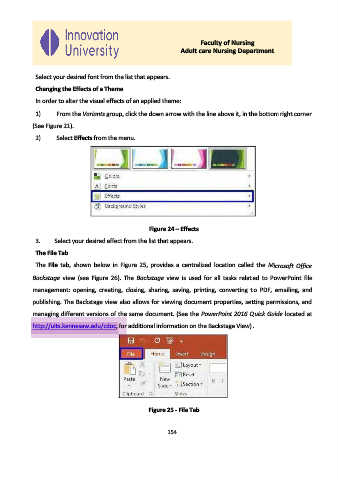
              2)     Select Effects from the menu.


                                                       Figure 24 – Effects

              3.    Select your desired effect from the list that appears.

              The File Tab

              The  File  tab,  shown  below  in  Figure 25,  provides  a  centralized  location  called  the  Microsoft  Office
             Backstage  view  (see  Figure  26).  The  Backstage  view  is  used  for  all  tasks  related  to PowerPoint  file

             management:  opening,  creating,  closing,  sharing,  saving,  printing,  converting  to  PDF,  emailing,  and

             publishing. The Backstage view also allows for viewing document properties, setting permissions, and

             managing different versions of the same document. (See the PowerPoint 2016 Quick Guide located at
             http://uits.kennesaw.edu/cdoc, for additional information on the Backstage View).


                                                      Figure 25 - File Tab


                                                             154

