


Page 144 - UNI 101 Computer Science Handout.
P. 144
Faculty of Nursing
                                                                  Adult care Nursing Department


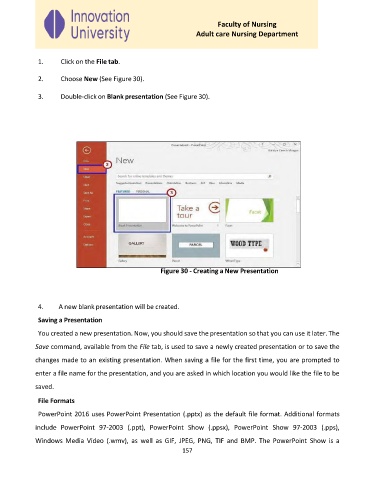
              1.     Click on the File tab.

              2.     Choose New (See Figure 30).


              3.     Double-click on Blank presentation (See Figure 30).


                                                      Figure 30 - Creating a New Presentation


              4.    A new blank presentation will be created.

              Saving a Presentation

              You created a new presentation. Now, you should save the presentation so that you can use it later. The

             Save command, available from the File tab, is used to save a newly created presentation or to save the

             changes made to an existing presentation. When saving a file for the first time, you are prompted to
             enter a file name for the presentation, and you are asked in which location you would like the file to be

             saved.

              File Formats

              PowerPoint 2016 uses PowerPoint Presentation (.pptx) as the default file format. Additional formats

             include  PowerPoint  97-2003  (.ppt),  PowerPoint  Show  (.ppsx),  PowerPoint  Show  97-2003  (.pps),
             Windows  Media  Video  (.wmv),  as  well  as  GIF,  JPEG,  PNG,  TIF  and  BMP.  The  PowerPoint  Show  is  a
                                                             157

