


Page 145 - UNI 101 Computer Science Handout.
P. 145
Faculty of Nursing
                                                                  Adult care Nursing Department


             presentation that always opens in Slide Show view rather than in Normal view.


              How to Save a Presentation


              1.     Click the File tab.


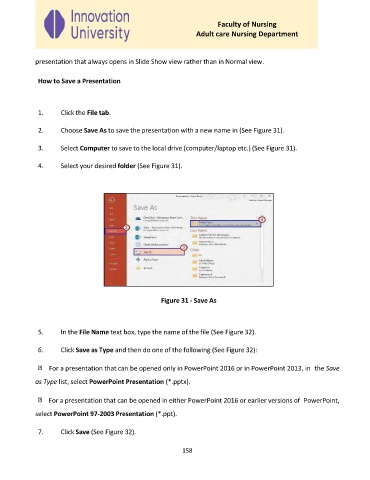
              2.     Choose Save As to save the presentation with a new name in (See Figure 31).


              3.     Select Computer to save to the local drive (computer/laptop etc.) (See Figure 31).

              4.     Select your desired folder (See Figure 31).


                                                      Figure 31 - Save As


              5.     In the File Name text box, type the name of the file (See Figure 32).

              6.     Click Save as Type and then do one of the following (See Figure 32):


                  For a presentation that can be opened only in PowerPoint 2016 or in PowerPoint 2013, in  the Save

             as Type list, select PowerPoint Presentation (*.pptx).


                  For a presentation that can be opened in either PowerPoint 2016 or earlier versions of  PowerPoint,

             select PowerPoint 97-2003 Presentation (*.ppt).

              7.     Click Save (See Figure 32).


                                                             158

