


Page 51 - Demo
P. 51
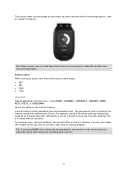
This screen shows the percentage of your target you have reached and the remaining distance, time or number of calories.
Progress alerts
When training to a goal, your watch alerts you at these stages:
50% 90% 100% 110%
Intervals
How to get there: Activity screen > Press DOWN > TRAINING > INTERVALS > WARMUP, WORK, REST, # SETS, or COOLDOWN.
Select this option to use interval training.
Interval training is short periods of exercise followed by rest. The main aim of interval training is to improve speed and cardiovascular fitness. For example, during a 20 minute walk-jog workout you could do an 8 minute fast walk, followed by 3 sets of 1 minute running and 2 minutes walking, then a 5 minute walk to cool down.
For warmup, work, rest and cooldown, you can set either a time or a distance. For sets, you choose the number of sets you want to include in your interval training program.
Tip: When running, you can head away from home until your progress reads 50% and then turn and come back again.
Tip: If you press RIGHT after setting the warmup details, you are then in the correct place to setup the rest of that interval set including work, rest etc.
51


