


Page 67 - Graphic Mac User Guide
P. 67
       Rotate Tool
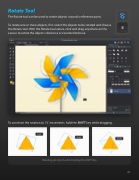
The Rotate tool can be used to rotate objects around a reference point.
To rotate one or more objects,  rst select the objects to be rotated and choose the Rotate tool. With the Rotate tool active, click and drag anywhere on the canvas to rotate the objects clockwise or counterclockwise.
      To constrain the rotation to 15˚ increments, hold the SHIFT key while dragging.
Rotating an object while holding the SHIFT key
     67


