


Page 94 - Graphic Mac User Guide
P. 94
 Drop Shadow effect
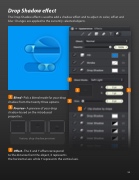
The Drop Shadow effect is used to add a shadow effect and to adjust its color, offset and blur. Changes are applied to the currently selected objects.
      Blend - Pick a blend mode for your drop shadow from the twenty three options.
Preview - A preview of your drop shadow based on the introduced properties.
Various drop shadow previews
Offset - The X and Y offset correspond
to the distance from the object, X represents
the horizontal axis while Y represents the vertical axis.
         94


