


Page 23 - 2026 Affinity Neurocare Benefit Guide Final v2
P. 23
Enrollment Instructions


         Employee Navigator


          First, review the materials in this benefits guide to make sure you understand all
          the options available.
          Step 1: Create an account and register with your company’s customized Employee
          Navigator Benefits Administration system by clicking the following hyperlink:
          •  Hyperlink to Register:  www.employeenavigator.com/benefits/Account/Register
          •  Company identifier: NDPdAN (no space, case sensitive)

          •  PIN: Last 4 digits of your social security number. Then continue to create your
              username (company email) and a password.
          Step 2: Once registered, you may Log into https://www.employeenavigator.com/
          benefits/account/login to enroll or reference your current benefits anytime 24
          hours a day. .
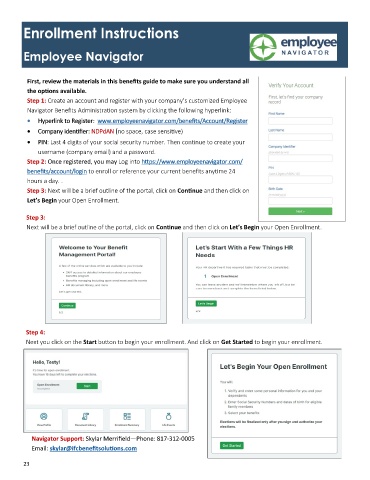
          Step 3: Next will be a brief outline of the portal, click on Continue and then click on
          Let’s Begin your Open Enrollment.

          Step 3:
          Next will be a brief outline of the portal, click on Continue and then click on Let’s Begin your Open Enrollment.


          Step 4:
          Next you click on the Start button to begin your enrollment. And click on Get Started to begin your enrollment.


           Navigator Support: Skylar Merrifield—Phone: 817-312-0005
           Email: skylar@ifcbenefitsolutions.com

         23

