


Page 176 - UNI 101 Computer Science Handout.
P. 176
Faculty of Nursing
                                                                  Adult care Nursing Department


             able to confidently work with the sophisticated pre-packaged application templates that

             come with Access.

              In this exercise, you’ll create a database application based on the Tasks template. This

             template is typical of those provided with Microsoft Access 2010, in that it looks nice

             and demonstrates a lot of the neat things you can do in a database.


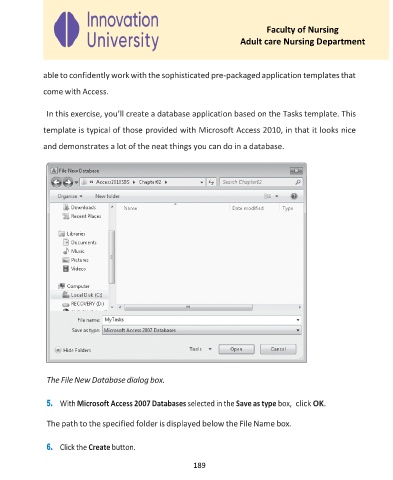
              The File New Database dialog box.

              5.  With Microsoft Access 2007 Databases selected in the Save as type box,  click OK.


              The path to the specified folder is displayed below the File Name box.


              6.  Click the Create button.

                                                     189

