


Page 98 - 24JAM_Pintar_Pemrograman_Android__1-libre
P. 98
24 JAM!! Pintar Pemrograman Android
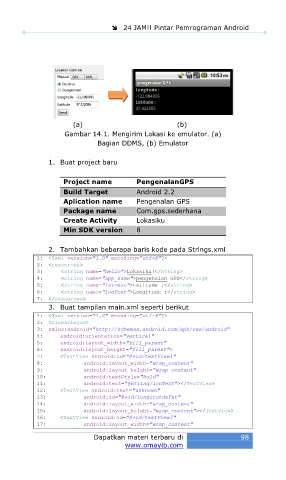
(a) (b)
Gambar 14.1. Mengirim Lokasi ke emulator. (a)
Bagian DDMS, (b) Emulator
1. Buat project baru
Project name PengenalanGPS
Build Target Android 2.2
Aplication name Pengenalan GPS
Package name Com.gps.sederhana
Create Activity Lokasiku
Min SDK version 8
2. Tambahkan beberapa baris kode pada Strings.xml
1: <?xml version="1.0" encoding="utf-8"?>
2: <resources>
3: <string name="hello">Lokasiku!</string>
4: <string name="app_name">pengenalan GPS</string>
5: <string name="latText">Latitude :</string>
6: <string name="lonText">Longitude :</string>
7: </resources>
3. Buat tampilan main.xml seperti berikut
1: <?xml version="1.0" encoding="utf-8"?>
2: <LinearLayout
3: xmlns:android="http://schemas.android.com/apk/res/android"
4: android:orientation="vertical"
5: android:layout_width="fill_parent"
6: android:layout_height="fill_parent">
7: <TextView android:id="@+id/textView1"
8: android:layout_width="wrap_content"
9: android:layout_height="wrap_content"
10: android:textStyle="bold"
11: android:text="@string/lonText"></TextView>
12: <TextView android:text="unknown"
13: android:id="@+id/longitutdeTxt"
14: android:layout_width="wrap_content"
15: android:layout_height="wrap_content"></TextView>
16: <TextView android:id="@+id/textView3"
17: android:layout_width="wrap_content"
Dapatkan materi terbaru di 98
www.omayib.com

