


Page 26 - search-engine-optimization-starter-guide
P. 26
SEO for Mobile Phones
                         Guide mobile users accurately


          Running desktop and mobile versions of
          your site


          One of the most common problems for webmasters who run
          both mobile and desktop versions of a site is that the mobile
          version of the site appears for users on a desktop computer, or
          that the desktop version of the site appears when someone
          accesses it on a mobile device. In dealing with this scenario, here
          are two viable options:

          Redirect mobile users to the correct
          version                                                 Desktop version              Mobile version


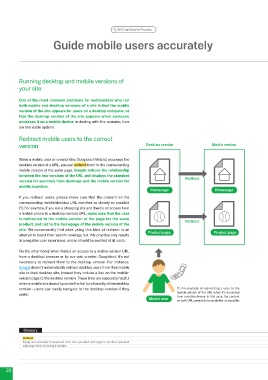
          When a mobile user or crawler (like Googlebot-Mobile) accesses the
          desktop version of a URL, you can redirect them to the corresponding
          mobile version of the same page. Google notices the relationship
          between the two versions of the URL and displays the standard            Redirect
          version for searches from desktops and the mobile version for
          mobile searches.
                                                                    Homepage                     Homepage
          If you redirect users, please make sure that the content on the
          corresponding mobile/desktop URL matches as closely as possible
          (1). For example, if you run a shopping site and there's an access from
          a mobile phone to a desktop-version URL, make sure that the user
          is redirected to the mobile version of the page for the same             Redirect
          product, and not to the homepage of the mobile version of the
          site. We occasionally find sites using this kind of redirect in an
          attempt to boost their search rankings, but this practice only results   Product page  Product page
          in a negative user experience, and so should be avoided at all costs.

          On the other hand, when there's an access to a mobile-version URL
          from a desktop browser or by our web crawler, Googlebot, it's not
          necessary to redirect them to the desktop-version. For instance,
          Google doesn't automatically redirect desktop users from their mobile
          site to their desktop site; instead they include a link on the mobile-
          version page to the desktop version. These links are especially helpful
          when a mobile site doesn't provide the full functionality of the desktop
          version—users can easily navigate to the desktop-version if they      (1) An example of redirecting a user to the
          prefer.                                                               mobile version of the URL when it's accessed
                                                                   Mobile user  from a mobile device. In this case, the content
                                                                                on both URLs needs to be as similar as possible.


           Glossary
           Redirect
           Being automatically transported from one specified web page to another specified
           web page when browsing a website.


    6

