


Page 10 - Manager's Notebook Flip 10 8 18
P. 10
LCSL Manager’s Notebook 10

Post-Game Reporting

Entering Scores and Misconduct

Each team is required to post the game score along with Player Misconduct into GotSoccer
within 48 hours of the completion of the game. All Game Cards for games during which a Red
card is received or a Red card suspension is being served must be sent to Ben Schoonover at the
LSA Office (ben@lsa-soccer.org) or faxed to 225-766-0623 and be received within 48 hours of
the completion of the game.

The score of an LCSL game can be entered using one of three different methods:

QR Code Reader

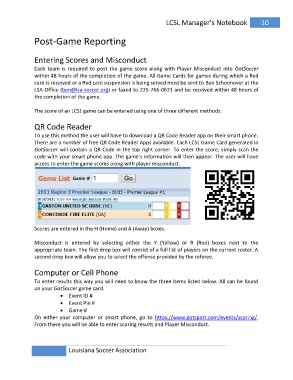
To use this method the user will have to download a QR Code Reader app on their smart phone.
There are a number of free QR Code Reader Apps available. Each LCSL Game Card generated in
GotSoccer will contain a QR Code in the top right corner. To enter the score, simply scan the
code with your smart phone app. The game’s information will then appear. The user will have
access to enter the game scores along with player misconduct.

Scores are entered in the H (Home) and A (Away) boxes.

Misconduct is entered by selecting either the Y (Yellow) or R (Red) boxes next to the
appropriate team. The first drop box will consist of a full list of players on the current roster. A
second drop box will allow you to select the offense provided by the referee.

Computer or Cell Phone

To enter results this way you will need to know the three items listed below. All can be found
on your GotSoccer game card.

             ? Event ID #
             ? Event Pin #
             ? Game #
On either your computer or smart phone, go to https://www.gotsport.com/events/scoring/.
From there you will be able to enter scoring results and Player Misconduct.

               Louisiana Soccer Association

