


Page 88 - JoFA_Jan_Apr23
P. 88
TECHNOLOGY Q&A


         MICROSOFT EXCEL
         Convert dates using Arabic numerals to dates with Roman numerals


         Q. Is there a    A. You can convert dates written with Arabic
         way to format    numerals to dates with Roman numerals. If you
         dates with       only had one date to convert, doing this manually
         Roman numerals   would probably be easier. However, if you have
         in Excel? For    several dates, there are steps to convert them all.
         example, can     Let’s start by looking at an example like the one
         I convert April   described in the question above. You can download
         15, 2023, to     the Excel workbook used in this article and access
         15-IV-2023?      a video demonstration of how to do this conver-
                          sion and others that accompany this article at
                          journalofaccountancy.com.
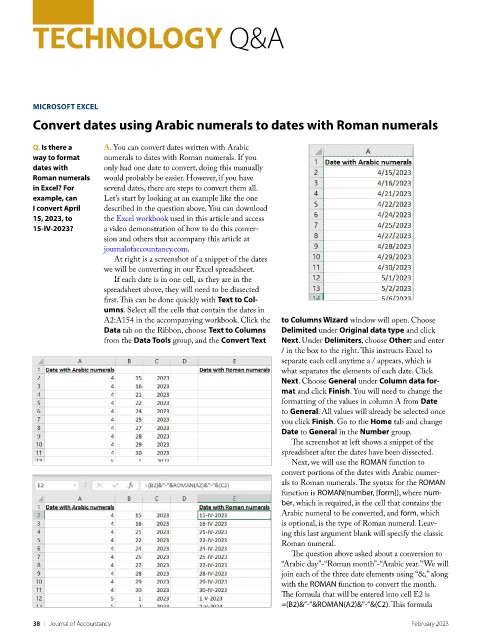
                            At right is a screenshot of a snippet of the dates
                          we will be converting in our Excel spreadsheet.
                            If each date is in one cell, as they are in the
                          spreadsheet above, they will need to be dissected
                          first. This can be done quickly with Text to Col-
                          umns. Select all the cells that contain the dates in
                          A2:A154 in the accompanying workbook. Click the   to Columns Wizard window will open. Choose
                          Data tab on the Ribbon, choose Text to Columns   Delimited under Original data type and click
                          from the Data Tools group, and the Convert Text   Next. Under Delimiters, choose Other: and enter
                                                                    / in the box to the right. This instructs Excel to
                                                                    separate each cell anytime a / appears, which is
                                                                    what separates the elements of each date. Click
                                                                    Next. Choose General under Column data for-
                                                                    mat and click Finish. You will need to change the
                                                                    formatting of the values in column A from Date
                                                                    to General. All values will already be selected once
                                                                    you click Finish. Go to the Home tab and change
                                                                    Date to General in the Number group.
                                                                      The screenshot at left shows a snippet of the
                                                                    spreadsheet after the dates have been dissected.
                                                                      Next, we will use the ROMAN function to
                                                                    convert portions of the dates with Arabic numer-
                                                                    als to Roman numerals. The syntax for the ROMAN
                                                                    function is ROMAN(number, [form]), where num-
                                                                    ber, which is required, is the cell that contains the
                                                                    Arabic numeral to be converted, and form, which
                                                                    is optional, is the type of Roman numeral. Leav-
                                                                    ing this last argument blank will specify the classic
                                                                    Roman numeral.
                                                                      The question above asked about a conversion to
                                                                    “Arabic day”-“Roman month”-“Arabic year.” We will
                                                                    join each of the three date elements using “&,” along
                                                                    with the ROMAN function to convert the month.
                                                                    The formula that will be entered into cell E2 is
                                                                    =(B2)&”-”&ROMAN(A2)&”-”&(C2). This formula

         38    |   Journal of Accountancy                                                         February 2023

