


Page 120 - Graphic Mac User Guide
P. 120
 Exporting Layers
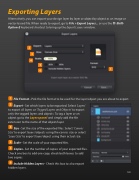
Alternatively, you can export your design layer by layer or object by object as an image or vector-based  le. When ready to export, go to File > Export Layers... or use the ⌘-Shift-
Option-E keyboard shortcut to bring up the Export Layers window.
File Format - Pick the  le format to be used for the layer/object you are about to export.
Export - Set which layers to be exported. Select ‘Layers’ to export all layers or ‘Tagged Layers and Objects’ to export only the tagged layers and objects. To tag a layer or an object go to the Layers panel and simply add the  le extension to the name of that object/layer.
Size - Set the size of the exported  les. Select ‘Canvas Size’ to export layers/objects using the canvas size or select ‘Layer Size’ to export layer/object using their actual size.
Scale - Set the scale of your exported  les.
Copies - Set the number of copies of your exported  les. Check one box to add one copy, check both boxes to add two copies.
Include Hidden Layers - Check this box to also export hidden layers.
               120


