


Page 118 - Graphic Mac User Guide
P. 118
 Exporting Designs
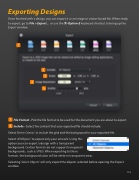
Once  nished with a design, you can export it as an image or vector-based  le. When ready to export, go to File > Export... or use the ⌘-Option-E keyboard shortcut to bring up the
Export window.
       File Format - Pick the  le format to be used for the document you are about to export.
Include - Select the content that your exported  le should include.
Select ‘Entire Canvas’ to include the grid and the background in your exported  le.
Select ‘All Objects’ to export only your artwork. Using this
option you can export a design with a transparent
background. Certain formats do not support transparent backgrounds, such as JPEG. When exporting to these
formats, the background color will be white in transparent areas.
Selecting ‘Select Objects’ will only export the objects selected before opening the Export window.
   118


