


Page 70 - Graphic Mac User Guide
P. 70
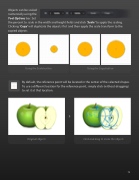
 Objects can be scaled
numerically using the
Tool Options bar. Set
the percent to scale in the width and height  elds and click ‘Scale’ to apply the scaling. Clicking ‘Copy’ will duplicate the objects  rst and then apply the scale transform to the copied objects.
Using the Scale button Using the Copy button
By default, the reference point will be located in the center of the selected shapes. To use a different location for the reference point, simply click (without dragging) to set it at that location.
Original objects Click and drag to resize the objects
                70


