


Page 71 - Graphic Mac User Guide
P. 71
                Shear Tool
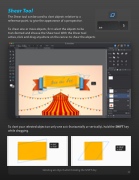
The Shear tool can be used to slant objects relative to a reference point, to give the appearance of a perspective.
To shear one or more objects,  rst select the objects to be transformed and choose the Shear tool. With the Shear tool
active, click and drag anywhere on the canvas to shear the objects.
           To slant your selected object on only one axis (horizontally or vertically), hold the SHIFT key while dragging.
   Slanting an object while holding the SHIFT key
 71


