


Page 98 - Graphic Mac User Guide
P. 98
 Inner Glow effect
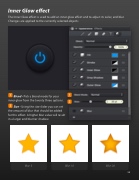
The Inner Glow effect is used to add an inner glow effect and to adjust its color, and blur. Changes are applied to the currently selected objects.
Blend - Pick a blend mode for your inner glow from the twenty three options.
Size - Using the size slider you can set the amount of blur that should be added for this effect. A higher blur value will result in a larger and blurrier shadow.
         Blur: 5 Blur: 10 Blur: 30
 98


