


Page 100 - Graphic Mac User Guide
P. 100
 Properties Panel
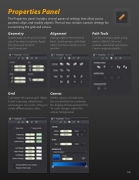
The Properties panel includes several panes of settings that allow you to position, align, and modify objects. The last two sections contain settings for customizing the grid and canvas.
  Geometry
Numerically set the position and size of an object or group. Apply the shear and rotation transformations.
Grid
Customize the canvas grid. Adjust X and Y spacing, subdivisions, and margins. Use color settings to create different paper styles.
Alignment
Arrange objects from front to back, create groups, and align object positions relative to one another.
Path Tools
Combine multiple paths using union, subtract, intersect, exclude, and divide operations. Create compound paths.
   Canvas
Set the canvas size and units. Use a scale factor to customize the display of measurements for ‘to-scale’ designs. Adjust the canvas background.
   100


