


Page 4 - Destaco - Table of Contents
P. 4
How to Make A DirectConnect  Mount
                                                                                                       ™

                                                                     Grippers/Slides/Rotates | Product Overview


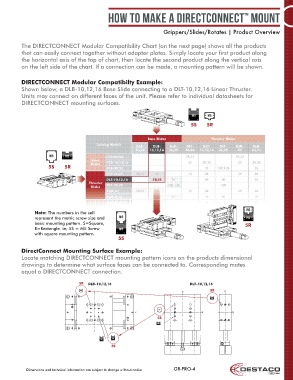
          The DIRECTCONNECT Modular Compatibility Chart (on the next page) shows all the products
          that can easily connect together without adapter plates. Simply locate your first product along
          the horizontal axis of the top of chart, then locate the second product along the vertical axis
          on the left side of the chart. If a connection can be made, a mounting pattern will be shown.


          DIRECTCONNECT Modular Compatibilty Example:
          Shown below, a DLB-10,12,16 Base Slide connecting to a DLT-10,12,16 Linear Thruster.
          Units may connect on different faces of the unit. Please refer to individual datasheets for
          DIRECTCONNECT mounting surfaces.


                                                                                 5S    5R


                     5S     5R


               Note: The numbers in the cell
               represent the metric screw size and
               basic mounting pattern. S=Square,                                                       5R
               R=Rectangle. ie; 5S = M5 Screw
               with square mounting pattern.
                                                  5S

          DirectConnect Mounting Surface Example:
          Locate matching DIRECTCONNECT mounting pattern icons on the products dimensional
          drawings to determine what surface faces can be connected to. Corresponding mates
          equal a DIRECTCONNECT connection.

                                  5R  DLB-10,12,16                              DLT-10,12,16
                                   M5                                        L C         5R    L C
                                         L C
                                                                                         M5 M5

                                                                   M5
                                                          L C                         L C         L C
                                                                   5S
                                                                   M5 M5


                                                M M55
                                           M33 M
                                                5S


            Dimensions and technical information are subject to change without notice  GR-PRO-4

