


Page 110 - JOJAPS_VOL15
P. 110
Address: Jl. Sei Serayu No.48 D Medan
             b.  Interviews were conducted directly with the MA. Daruttaqwa about how the learning system that is being used at the MA.
                 Daruttaqwa  so  that  researchers  can  find  out  the  advantages  and  disadvantages  of  the  application  as  a  reference  for
                 applications that will be made later.

             3.3  Application Design
                 At this stage before making application programs, researchers design applications using UML (Unified Modeling system)
                 which  includes  use  case  diagrams,  class  diagrams,  sequence  diagrams,  activity  diagrams  and  deployment  diagrams.
                 Aiming  to  describe  the  workflow  of  a  system  that  researchers  created,  then  an  interface  design  overview  about  the
                 Learning Media System using Application-based blended learning methods in this case the authors designed an Android
                 application (E-learning)
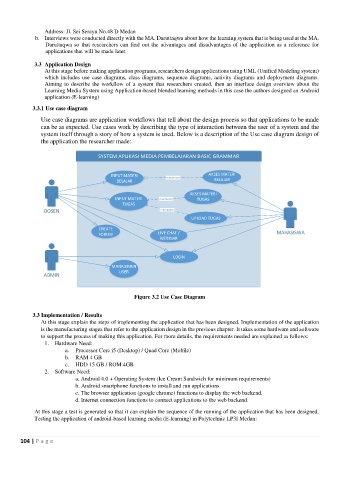
            3.3.1 Use case diagram

               Use case diagrams are application workflows that tell about the design process so that applications to be made
               can be as expected. Use cases work by describing the type of interaction between the user of a system and the
               system itself through a story of how a system is used. Below is a description of the Use case diagram design of
               the application the researcher made:


                                        INPUT MATERI                      AKSES MATERI
                                                           <<extend>>
                                          BELAJAR                           BELAJAR
                                                                    AKSES MATERI
                                          INPUT MATERI   <<extend>>   TUGAS
                                            TUGAS
                 DOSEN                                   <<include>>
                                                                    UPLOAD TUGAS

                                    CREATE
                                    FORUM                LIVE CHAT /                              MAHASISWA
                                                         WEBINAR


                                                              LOGIN
                                        MANAJEMEN
                                           USER
                ADMIN

                                                Figure 3.2 Use Case Diagram


            3.3 Implementation / Results
               At this stage explain the steps of implementing the application that has been designed. Implementation of the application
               is the manufacturing stages that refer to the application design in the previous chapter. It takes some hardware and software
               to support the process of making this application. For more details, the requirements needed are explained as follows:
                 1.  Hardware Need:
                        a.  Processor Core i5 (Desktop) / Quad Core (Mobile)
                        b.  RAM 4 GB
                        c.  HDD 15 GB / ROM 4GB
                 2.  Software Need:
                            a. Android 4.0 + Operating System (Ice Cream Sandwich for minimum requirements)
                            b. Android smartphone functions to install and run applications
                            c. The browser application (google chrome) functions to display the web backend.
                            d. Internet connection functions to connect applications to the web backend.

             At this stage a test is generated so that it can explain the sequence of the running of the application that has been designed.
             Testing the application of android-based learning media (E-learning) in Polytechnic LP3I Medan:


        104 | P a g e

