


Page 103 - UNI 101 Computer Science Handout.
P. 103
Faculty of Nursing
                                                                  Adult care Nursing Department


              3. Click Save As.

              4. In the Save as type list, click Word 97-2003 Document. This changes the file format to .doc.

              5. In the File name box, type a name for the document.
              6. Click Save.

              The CutePDF Writer Addition

              With the deployment of all new staff computers, there will be a program loaded called CutePDF Writer.

             The purpose of this program is to allow you to create PDF files from any Windows program that is able

             to print. If you needed to send a document to someone who doesn’t have Word or a compatible  version,
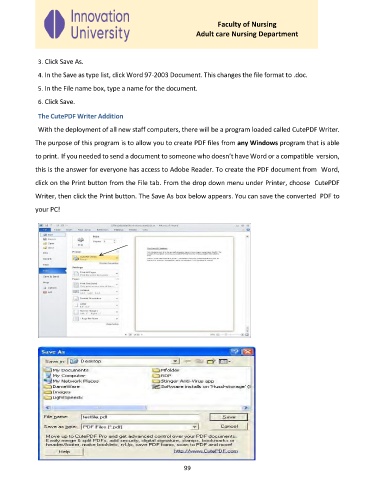
             this is the answer for everyone has access to Adobe Reader. To create the PDF document from  Word,

             click on the Print button from the File tab. From the drop down menu under Printer, choose  CutePDF

             Writer, then click the Print button. The Save As box below appears. You can save the converted  PDF to
             your PC!


                                                              99

