


Page 99 - UNI 101 Computer Science Handout.
P. 99
Faculty of Nursing
                                                                  Adult care Nursing Department


              References Tab

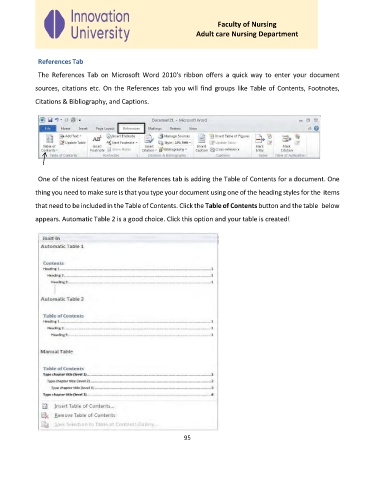
              The  References  Tab  on  Microsoft  Word  2010's  ribbon  offers  a  quick  way  to  enter  your  document

             sources, citations etc.  On the  References  tab you will find  groups like Table of Contents, Footnotes,
             Citations & Bibliography, and Captions.


              One of the nicest features on the References tab is adding the Table of Contents for a document. One

             thing you need to make sure is that you type your document using one of the heading styles for the  items

             that need to be included in the Table of Contents. Click the Table of Contents button and the table  below
             appears. Automatic Table 2 is a good choice. Click this option and your table is created!


                                                              95

