


Page 96 - UNI 101 Computer Science Handout.
P. 96
Faculty of Nursing
                                                                  Adult care Nursing Department


              The Insert Tab


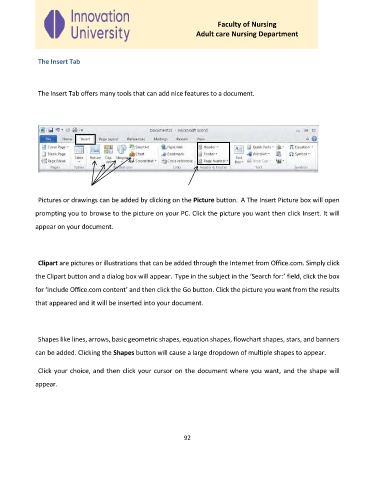
              The Insert Tab offers many tools that can add nice features to a document.


              Pictures or drawings can be added by clicking on the Picture button.  A The Insert Picture box will open
             prompting you to browse to the picture on your PC. Click the picture you want then click Insert. It will

             appear on your document.


              Clipart are pictures or illustrations that can be added through the Internet from Office.com. Simply click
             the Clipart button and a dialog box will appear. Type in the subject in the ‘Search for:’ field, click the box

             for ‘Include Office.com content’ and then click the Go button. Click the picture you want from the results

             that appeared and it will be inserted into your document.


              Shapes like lines, arrows, basic geometric shapes, equation shapes, flowchart shapes, stars, and banners

             can be added. Clicking the Shapes button will cause a large dropdown of multiple shapes to appear.


              Click your choice, and then click your cursor on the document where you want, and the shape will

             appear.


                                                              92

