


Page 117 - UNI 101 Computer Science Handout.
P. 117
Faculty of Nursing
                                                                  Adult care Nursing Department


              Autosum Function


              The most common formula in Excel is SUM, or the addition of multiple values. In this example, we could
             create a formula that reads =C6+D6+E6+F6+G6+H6. That’s a lot of typing! Instead, we can use the SUM

             function and specify a range of cells.


              Functions are more complex formulas that are invoked by typing their name. In this example, we will

             use the SUM function. Excel has over 200 functions that can be used. Because SUM is the most common

             function, it is the only one with its own toolbar button.


              When working with functions, the cells used in the formula are referred to as the range. A range is a
             group of cells that are specified by naming the first cell in the group and the last cell. For example, A1:D1

             is a range that includes cells A1, B1, C1 and D1.


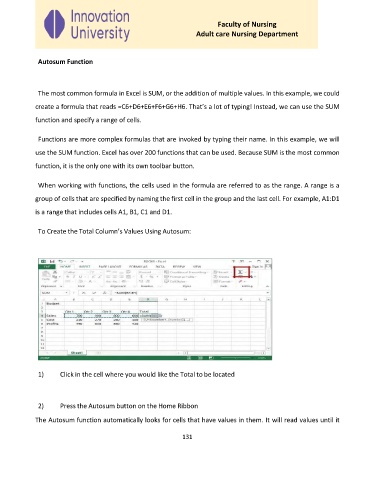
              To Create the Total Column’s Values Using Autosum:


              1)     Click in the cell where you would like the Total to be located


              2)     Press the Autosum button on the Home Ribbon

             The Autosum function automatically looks for cells that have values in them. It will read values until it


                                                             131

