


Page 79 - UNI 101 Computer Science Handout.
P. 79
Faculty of Nursing
                                                                  Adult care Nursing Department


              The Quick Access Toolbar


              The Quick Access Toolbar is located in the upper left corner and is intended to store the buttons you will

             use most often.


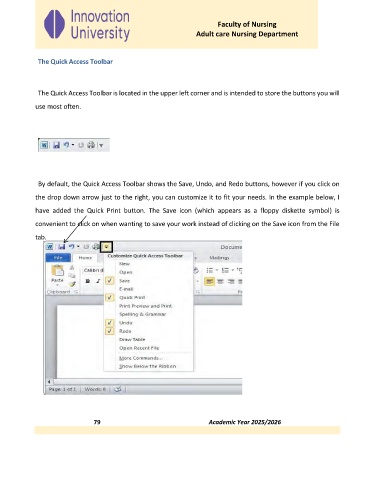
              By default, the Quick Access Toolbar shows the Save, Undo, and Redo buttons, however if you click on

             the drop down arrow just to the right, you can customize it to fit your needs. In the example below, I

             have  added  the  Quick  Print  button.  The  Save  icon  (which  appears  as  a  floppy  diskette  symbol)  is

             convenient to click on when wanting to save your work instead of clicking on the Save icon from the File
             tab.


                                79                                                                        Academic Year 2025/2026

