


Page 31 - Seametrics Product Catalog 2015_062415
P. 31
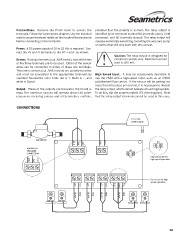
Connections. Remove the PS40 cover to access the                  provided that the polarity is correct. The relay output is
terminals. Follow the Connections diagram. Use the included       identified by its terminals marked NO (normally open), COM
nuts to secure the strain reliefs on the inside of the enclosure  (common), and NC (normally closed). The relay output will
before connecting to the terminals.                               operate essentially everything, including the very rare pump
Power. A DC power supply of 10 to 32 Vdc is required. Con-        or control that will only work with dry contact.
nect the +V and -V terminals to the DC + and - as shown.
Sensor. If using a two-wire (e.g., MJR meter), note which two                        Caution: The relay output is designed for
of the three terminals are to be used. Either of the sensor                          electronic controls only. Maximum current
wires can be connected to either of these two terminals.                             load is 250 mA.
Three-wire sensors (e.g., MJE meters) are polarity-sensitive      High Speed Input. It may be occasionally desirable to
and must be connected to the appropriate terminals by             use the PS40 with a high-speed input, such as an IP800
standard Seametrics color code: red is +, black is - , and        paddlewheel flow sensor. If the sensor will be putting out
white is Signal.                                                  more than 50 pulses per second, it is necessary to disable
Output. Three of the outputs are transistor, the fourth is        the relay output, which cannot operate at such high speeds.
relay. The transistor outputs will operate almost all pulse-      To do this, clip the jumper marked JP1 (see diagram). Note
responsive metering pumps and all Seametrics controls,            that the relay output terminals cannot be used in this case.

CONNECTIONS

                                                                                                 10-32 Vdc
                                                                                                 power supply

             MJE METER                                              +Vdc                                                               JP1
MJR METER-                                                   -Vdc
TWO-WIRE                                                                                         JP1
CONNECTION                          +12V                                                                                       Clip this jumper for
                              SIG                                                                                              high speed operation
                        GND

            +12V
      SIG
GND

                                                 +OP RED                +OP RED              NC                Do not use for high
                                          -OP BLACK               -OP BLACK            COM                     speed operation
                                                                                 NO
                              +OP RED
                        -OP BLACK                                                      RED
                                                                                 BLACK

                                                                                                                                    18

