


Page 7 - beta1234
P. 7
Your Receiver وصل جهاز الاستقبال
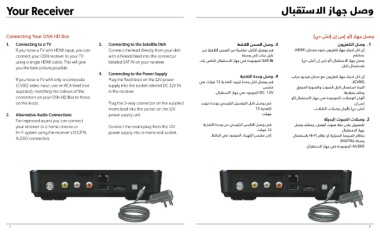
Connecting Your OSN HD Box 3. Connecting to the Satellite Dish وصل الصحن اللاقط.3 )وصل جهاز (أو إس إن إتش دي
Connect the lead directly from your dish قم بوصل الكابل مباشر ًة من الصحن اللاقط من
1. Connecting to a TV with a Nilesat feed into the connector وصل التلفزيون.1
If you have a TV with HDMI input, you can labeled SAT IN on your receiver. نايل سات إلى وصلة ،HDMI إن كان لديك جهاز تلفزيون مزود بمدخل
connect your OSN receiver to your TV . الموجودة في جهاز الاستقبال الخاص بكSAT-IN
using a single HDMI cable. This will give 4. Connecting to the Power Supply يمكنكم
you the best picture possible. Plug the fixed lead on the 12V power وصل وحدة التغذية.4 )وصل جهاز الاستقبال (أو إس إن إتش دي
supply into the socket labeled DC 12V IN فولت في12 قم بوصل كابل وحدة تزويد التغذية
If you have a TV with only a composite in the receiver. .باستعمال كابل
(CVBS) video input, use an RCA lead (not مقبس
supplied), matching the colours of the Plug the 2-way connector on the supplied . الموجود في جهاز االستقبالD C- 12V إن كان لديك جهاز تلفزيون مع مدخل فيديو مركب
connectors on your OSN HD Box to those mains lead into the socket on the 12V ،)CVBS(
on the leads. power supply unit. قم بوصل كابل التوصيل الرئيسي بوحدة تزويد
12 التغذية الرجاء استعمال كابل الصوت والصورة المرفق
2. Alternative Audio Connections Connect the mains plug from the 12V .فولت وذلك بمقارنة
For improved sound you can connect power supply into a mains wall socket.
your receiver to a home cinema or قم بوصل القابس الرئيسي من وحدة التغذية ألوان الوصلات الموجودة في جهاز االستقبال (أو
Hi-Fi system using the receiver’s DIGITAL فولت12 إس إن
AUDIO connectors.
.إلى مقبس الكهرباء الموجود في الحائط .إتش دي) بألوان وصلات الكابلات
وصلات الصوت البديلة.2
يمكنك وصل،للحصول على دقة صوت أفضل
جهاز الاستقبال
باستعمالHi-Fi بنظام السينما المنزلية أو نظام
DIGITAL وصلة
. الموجودة في جهاز الاستقبالA UDIO
77

