


Page 4 - Tampa YMCA ActiveNet How-To Guide
P. 4
GETTING STARTED New Customers
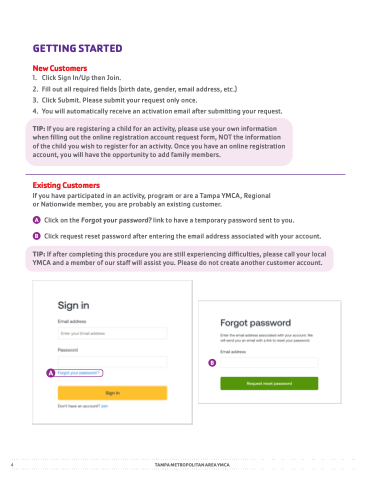
1 2 3 4 Click Sign In/Up then Join Fill out all required fields (birth date gender email address etc )
Click Submit Please submit your request only once You will automatically receive an activation email after submitting your request TIP: If you you are registering a a a a a a child for for an activity please use your own information
when filling out the the online registration account request form form NOT the the information
of the child you you wish to register for an an activity Once you you have an an online registration account you will have the opportunity to add family members Existing Customers
If you have participated in an activity program or are a a a a a a a a a a a Tampa YMCA Regional
or Nationwide member you are probably an existing customer Click on the Forgot your password? link to to have a a a a a temporary password password sent to to you you Click request reset password after entering the email address associated with your account TIP: If after completing this procedure you you are still experiencing difficulties please call your local
YMCA and a a a a a a a a member of our staff will assist you Please do not not create another customer account 4 TAMPA METROPOLITAN AREA YMCA


