


Page 128 - Sterilization Training Manual
P. 128
II. OPERATION / CALIBRATION
Installing WinPCLink Software
Run the Setup from the diskette or CD.
Optional Desktop Icon Setting
If you created the WinPCLink desktop icon with the setup program:
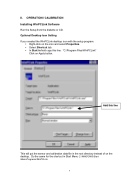
• Right-click on the icon and select Properties.
• Select Shortcut tab.
• In Start in field copy this line: “C:\Program Files\WinPCLink”
Click on Apply button.
This will put the sensor and calibration data file in the root directory instead of on the desktop. Do the same for the shortcut in Start Menu C:\WINDOWS\Start Menu\Programs\WinPCLink
5
Add this line


