


Page 130 - Sterilization Training Manual
P. 130
Read Serial Number of Device
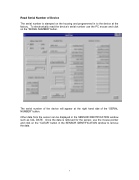
The serial number is stamped on the housing and programmed in to the device at the factory. To electronically read the device’s serial number use the PC mouse and click on the “SERIAL NUMBER” button.
The serial number of the device will appear at the right hand side of the “SERIAL NUMBER” button.
Other data from the sensor can be displayed in the SENSOR IDENTIFICATION window such as CAL DATE. Once the data is retrieved for the sensor, use the mouse pointer and click on the “CLEAR” button in the SENSOR IDENTIFICATION window to remove the data.
7


