


Page 21 - Advantech WP-5530
P. 21
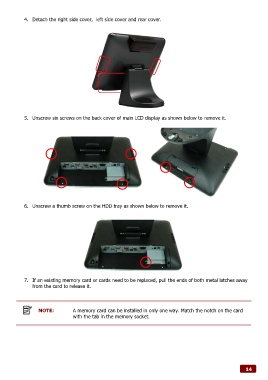
4.  Detach the right side cover,  left side cover and rear cover.


            5.  Unscrew six screws on the back cover of main LCD display as shown below to remove it.


            6.  Unscrew a thumb screw on the HDD tray as shown below to remove it.


            7.  If an existing memory card or cards need to be replaced, pull the ends of both metal latches away
               from the card to release it.


                  NOTE:          A memory card can be installed in only one way. Match the notch on the card
                                 with the tab in the memory socket.


                                                                                                              14

