


Page 929 - Med Plaza and Cancer Center
P. 929
PROPRIETARY AND CONFIDENTIAL DRAFT 28/Feb/03

                   6.2  Setting up the Internet Interface
                   Chapter 6: General Procedures

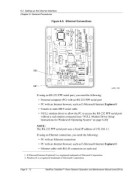
                                              Figure 6-5.  Ethernet Connections


                                 If using an RS-232 PPP serial port, you need the following:
                                   • Personal computer (PC) with an RS-232 PPP serial port

                                   • PC with an Internet browser, such as E-Microsoft Internet Explorer® 1
                                   • Female to male DB-9 serial cable

                                   • NULL modem driver to allow the PC to access the RS-232 PPP serial port
                                     without a real modem connected (see “NULL Modem Driver Setup
                                     Instructions for Windows® Operating System” on page 6-20)  2


                                 NOTE:
                                 The RS-232 PPP serial port uses a fixed IP address of 192.168.1.1.


                                 If using an Ethernet connection, you need the following:
                                   • PC with an Ethernet connection

                                   • PC with an Internet browser, such as E-Microsoft Internet Explorer®
                                   • Ethernet cable with RG-45 connectors on each end


                       1. E-Microsoft Internet Explorer® is a registered trademark of Microsoft Corporation.
                       2. Windows® is a registered trademark of Microsoft Corporation.


                   Page 6 - 12           MedPlus TotalAlert™ Alarm Network Operation and Maintenance Manual (man291ra)

