


Page 122 - JoFA_Jan_Apr23
P. 122
The auditor must                          Nested IF statements used to identify strata
                                                    members
          specify upper                               Cell                     Cell formula

                                                      E27    =IF(C27>=Stratum_1_Lower_Boundary,IF(C27<=Stratum_1_
          and lower limits                                         Upper_Boundary,C27,"Excluded"),"Excluded")

                                                      E28    =IF(C28>=Stratum_1_Lower_Boundary,IF(C28<=Stratum_1_
                                                                   Upper_Boundary,C28,"Excluded"),"Excluded")
          on the total                                E29    =IF(C29>=Stratum_1_Lower_Boundary,IF(C29<=Stratum_1_

                                                                   Upper_Boundary,C29,"Excluded"),"Excluded")
          sample size.                                F27    =IF(C27>=Stratum_2_Lower_Boundary,IF(C27<=Stratum_2_

                                                                   Upper_Boundary,C27,"Excluded"),"Excluded")

                                                      F28    =IF(C28>=Stratum_2_Lower_Boundary,IF(C28<=Stratum_2_
                                                                   Upper_Boundary,C28,"Excluded"),"Excluded")
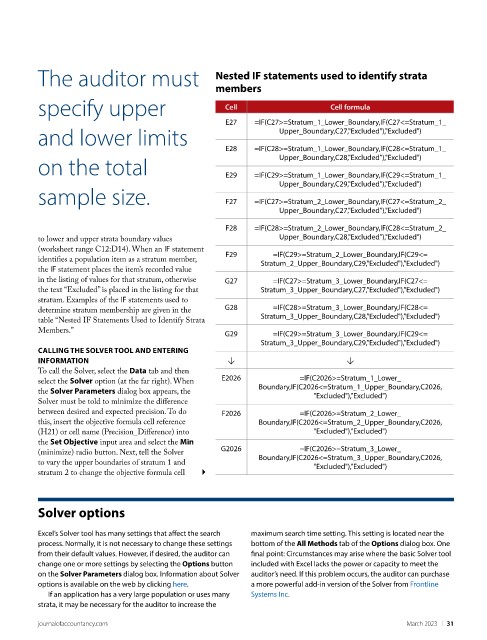
          to lower and upper strata boundary values
          (worksheet range C12:D14). When an IF statement
                                                      F29         =IF(C29>=Stratum_2_Lower_Boundary,IF(C29<=
          identifies a population item as a stratum member,
                                                               Stratum_2_Upper_Boundary,C29,"Excluded"),"Excluded")
          the IF statement places the item’s recorded value
          in the listing of values for that stratum, otherwise   G27  =IF(C27>=Stratum_3_Lower_Boundary,IF(C27<=
          the text “Excluded” is placed in the listing for that   Stratum_3_Upper_Boundary,C27,"Excluded"),"Excluded")
          stratum. Examples of the IF statements used to
                                                      G28         =IF(C28>=Stratum_3_Lower_Boundary,IF(C28<=
          determine stratum membership are given in the
                                                               Stratum_3_Upper_Boundary,C28,"Excluded"),"Excluded")
          table “Nested IF Statements Used to Identify Strata
          Members.”                                   G29         =IF(C29>=Stratum_3_Lower_Boundary,IF(C29<=
                                                               Stratum_3_Upper_Boundary,C29,"Excluded"),"Excluded")
          CALLING THE SOLVER TOOL AND ENTERING
          INFORMATION                                  ↓                           ↓
          To call the Solver, select the Data tab and then
                                                     E2026              =IF(C2026>=Stratum_1_Lower_
          select the Solver option (at the far right). When
                                                              Boundary,IF(C2026<=Stratum_1_Upper_Boundary,C2026,
          the Solver Parameters dialog box appears, the
                                                                           "Excluded"),"Excluded")
          Solver must be told to minimize the difference
          between desired and expected precision. To do   F2026         =IF(C2026>=Stratum_2_Lower_
          this, insert the objective formula cell reference   Boundary,IF(C2026<=Stratum_2_Upper_Boundary,C2026,
          (H21) or cell name (Precision_Difference) into                   "Excluded"),"Excluded")
          the Set Objective input area and select the Min
                                                     G2026              =IF(C2026>=Stratum_3_Lower_
          (minimize) radio button. Next, tell the Solver
                                                              Boundary,IF(C2026<=Stratum_3_Upper_Boundary,C2026,
          to vary the upper boundaries of stratum 1 and
                                                                           "Excluded"),"Excluded")
          stratum 2 to change the objective formula cell

          Solver options


          Excel’s Solver tool has many settings that affect the search   maximum search time setting. This setting is located near the
          process. Normally, it is not necessary to change these settings   bottom of the All Methods tab of the Options dialog box. One
          from their default values. However, if desired, the auditor can   final point: Circumstances may arise where the basic Solver tool
          change one or more settings by selecting the Options button   included with Excel lacks the power or capacity to meet the
          on the Solver Parameters dialog box. Information about Solver   auditor’s need. If this problem occurs, the auditor can purchase
          options is available on the web by clicking here.   a more powerful add-in version of the Solver from Frontline
            If an application has a very large population or uses many   Systems Inc.
          strata, it may be necessary for the auditor to increase the


          journalofaccountancy.com                                                               March 2023    |   31

