


Page 264 - JoFA_2022
P. 264
TECHNOLOGY Q&A


         MICROSOFT EXCEL
         Using SUMIFS to sum with multiple conditions


         Q. I read the    A. SUMIF will only sum up totals based on one   The syntax for SUMIFS is SUMIFS(sum_range,
         June 2020 JofA   condition (also referred to as criteria). In that   criteria_range1, criteria1, [criteria_range2,
         article on SUMIF.   June 2020 JofA article (see “Reaching the SUMIF,”   criteria2], ...). The first three arguments are required,
         I have tried to   JofA, June 2020), we summed up the total dollar   with additional arguments to be added depending
         use it in my Excel   amount for just the financial reporting audits and   on how many criteria are to be included. The first
         spreadsheet, but   then summed up the total dollar amount for just   required argument is sum_range, which are the
         it won’t work    the IT audits. Each sum had only one condi-  actual cells to sum. The second required argument
         since I have     tion — the type of audit. If you need to create a   is criteria_range1, which is the range of cells where
         multiple criteria.   sum based on more than one criteria, you can use   the criteria are located. The third required argu-
         Is there a way   SUMIFS. It accomplishes the same task as SUMIF   ment is criteria1, which is the criteria to be found
         to get SUMIF to   but allows you to set anywhere from one to 255   in criteria_range1. If you have multiple criteria, it
         work if you have   conditions.                             doesn’t matter which criteria you list first, second,
         more than one      I have created a workbook with an example of   and so on. Just be sure to define the criteria range 1
         condition?       using SUMIFS. You can access the Excel workbook   and criteria 1 describing the same condition, criteria
                          and accompanying video with the online version   range 2 and criteria 2 describing the same condi-
                          of this article at journalofaccountancy.com. Note   tion, and so on.
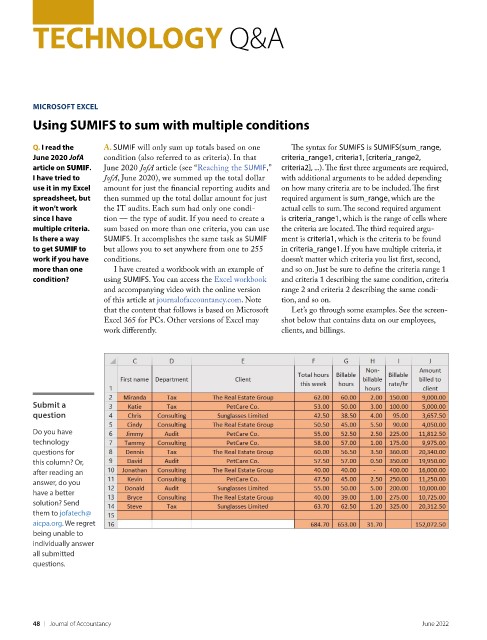
                          that the content that follows is based on Microsoft   Let’s go through some examples. See the screen-
                          Excel 365 for PCs. Other versions of Excel may   shot below that contains data on our employees,
                          work differently.                         clients, and billings.


         Submit a
         question

         Do you have
         technology
         questions for
         this column? Or,
         after reading an
         answer, do you
         have a better
         solution? Send
         them to jofatech@
         aicpa.org. We regret
         being unable to
         individually answer
         all submitted
         questions.


         48    |   Journal of Accountancy                                                            June 2022

