


Page 312 - JoFA_2022
P. 312
TECHNOLOGY Q&A


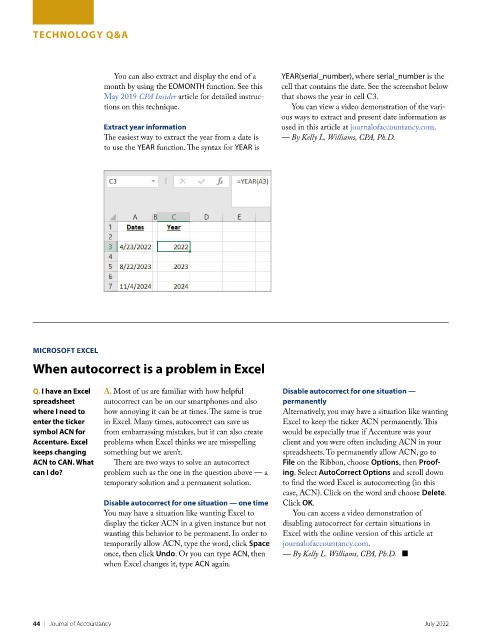
                            You can also extract and display the end of a   YEAR(serial_number), where serial_number is the
                          month by using the EOMONTH function. See this   cell that contains the date. See the screenshot below
                          May 2019 CPA Insider article for detailed instruc-  that shows the year in cell C3.
                          tions on this technique.                    You can view a video demonstration of the vari-
                                                                    ous ways to extract and present date information as
                          Extract year information                  used in this article at journalofaccountancy.com.
                          The easiest way to extract the year from a date is   — By Kelly L. Williams, CPA, Ph.D.
                          to use the YEAR function. The syntax for YEAR is


         MICROSOFT EXCEL
         When autocorrect is a problem in Excel


         Q. I have an Excel   A. Most of us are familiar with how helpful   Disable autocorrect for one situation —
         spreadsheet      autocorrect can be on our smartphones and also   permanently
         where I need to   how annoying it can be at times. The same is true   Alternatively, you may have a situation like wanting
         enter the ticker   in Excel. Many times, autocorrect can save us   Excel to keep the ticker ACN permanently. This
         symbol ACN for   from embarrassing mistakes, but it can also create   would be especially true if Accenture was your
         Accenture. Excel   problems when Excel thinks we are misspelling   client and you were often including ACN in your
         keeps changing   something but we aren’t.                  spreadsheets. To permanently allow ACN, go to
         ACN to CAN. What   There are two ways to solve an autocorrect   File on the Ribbon, choose Options, then Proof-
         can I do?        problem such as the one in the question above — a   ing. Select AutoCorrect Options and scroll down
                          temporary solution and a permanent solution.   to find the word Excel is autocorrecting (in this
                                                                    case, ACN). Click on the word and choose Delete.
                          Disable autocorrect for one situation — one time  Click OK.
                          You may have a situation like wanting Excel to   You can access a video demonstration of
                          display the ticker ACN in a given instance but not   disabling autocorrect for certain situations in
                          wanting this behavior to be permanent. In order to   Excel with the online version of this article at
                          temporarily allow ACN, type the word, click Space   journalofaccountancy.com.
                          once, then click Undo. Or you can type ACN, then   — By Kelly L. Williams, CPA, Ph.D.   ■
                          when Excel changes it, type ACN again.


         44    |   Journal of Accountancy                                                            July 2022

