


Page 310 - JoFA_2022
P. 310
TECHNOLOGY Q&A


         MICROSOFT EXCEL
         Extract and present information about dates in Excel


         Q. I receive Excel   A. There are several ways to extract and present date   Format_text, is the format that we want to apply
         spreadsheets     information. We will look at a few ways to extract   to the text.
         regularly that   and present information about the day, month, and   In order to extract the day and present it as
         contain dates. I   then year. To help walk through this process, you   the three-letter abbreviation, define Value as the
         have to manually   can download an Excel workbook and access an   cell that contains the date. Define Format_text
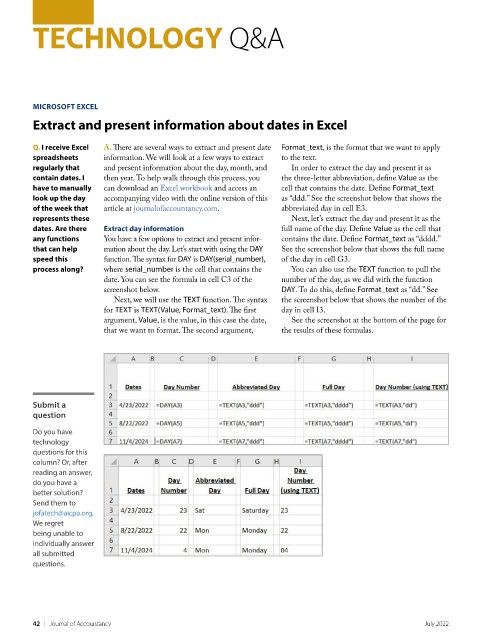
         look up the day   accompanying video with the online version of this   as “ddd.” See the screenshot below that shows the
         of the week that   article at journalofaccountancy.com.    abbreviated day in cell E3.
         represents these                                             Next, let’s extract the day and present it as the
         dates. Are there   Extract day information                 full name of the day. Define Value as the cell that
         any functions    You have a few options to extract and present infor-  contains the date. Define Format_text as “dddd.”
         that can help    mation about the day. Let’s start with using the DAY   See the screenshot below that shows the full name
         speed this       function. The syntax for DAY is DAY(serial_number),   of the day in cell G3.
         process along?   where serial_number is the cell that contains the   You can also use the TEXT function to pull the
                          date. You can see the formula in cell C3 of the   number of the day, as we did with the function
                          screenshot below.                         DAY. To do this, define Format_text as “dd.” See
                            Next, we will use the TEXT function. The syntax   the screenshot below that shows the number of the
                          for TEXT is TEXT(Value, Format_text). The first   day in cell I3.
                          argument, Value, is the value, in this case the date,   See the screenshot at the bottom of the page for
                          that we want to format. The second argument,   the results of these formulas.


         Submit a
         question

         Do you have
         technology
         questions for this
         column? Or, after
         reading an answer,
         do you have a
         better solution?
         Send them to
         jofatech@aicpa.org.
         We regret
         being unable to
         individually answer
         all submitted
         questions.


         42    |   Journal of Accountancy                                                            July 2022

