


Page 354 - JoFA_2022
P. 354
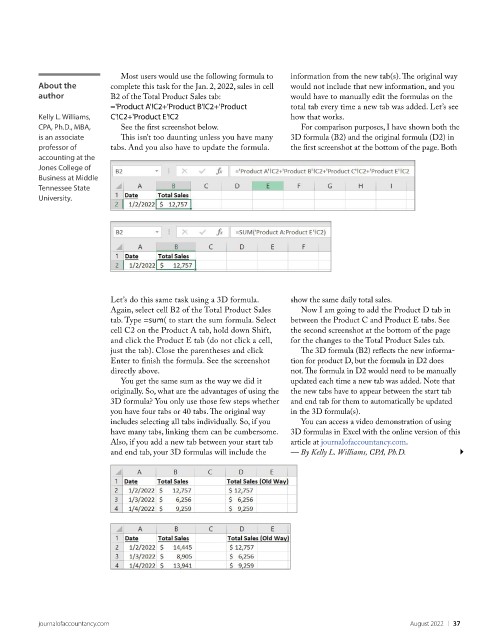
Most users would use the following formula to   information from the new tab(s). The original way
           About the        complete this task for the Jan. 2, 2022, sales in cell   would not include that new information, and you
           author           B2 of the Total Product Sales tab:           would have to manually edit the formulas on the
                            ='Product A'!C2+'Product B'!C2+'Product      total tab every time a new tab was added. Let’s see
           Kelly L. Williams,   C'!C2+'Product E'!C2                     how that works.
           CPA, Ph.D., MBA,    See the first screenshot below.              For comparison purposes, I have shown both the
           is an associate     This isn’t too daunting unless you have many   3D formula (B2) and the original formula (D2) in
           professor of     tabs. And you also have to update the formula.   the first screenshot at the bottom of the page. Both
           accounting at the
           Jones College of
           Business at Middle
           Tennessee State
           University.


                            Let’s do this same task using a 3D formula.   show the same daily total sales.
                            Again, select cell B2 of the Total Product Sales   Now I am going to add the Product D tab in
                            tab. Type =sum( to start the sum formula. Select   between the Product C and Product E tabs. See
                            cell C2 on the Product A tab, hold down Shift,   the second screenshot at the bottom of the page
                            and click the Product E tab (do not click a cell,   for the changes to the Total Product Sales tab.
                            just the tab). Close the parentheses and click   The 3D formula (B2) reflects the new informa-
                            Enter to finish the formula. See the screenshot   tion for product D, but the formula in D2 does
                            directly above.                              not. The formula in D2 would need to be manually
                               You get the same sum as the way we did it   updated each time a new tab was added. Note that
                            originally. So, what are the advantages of using the   the new tabs have to appear between the start tab
                            3D formula? You only use those few steps whether   and end tab for them to automatically be updated
                            you have four tabs or 40 tabs. The original way   in the 3D formula(s).
                            includes selecting all tabs individually. So, if you   You can access a video demonstration of using
                            have many tabs, linking them can be cumbersome.   3D formulas in Excel with the online version of this
                            Also, if you add a new tab between your start tab   article at journalofaccountancy.com.
                            and end tab, your 3D formulas will include the   — By Kelly L. Williams, CPA, Ph.D.


           journalofaccountancy.com                                                                    August 2022    |   37

