


Page 355 - JoFA_2022
P. 355
TECHNOLOGY Q&A


         MICROSOFT EXCEL
         Change the case of text in Excel


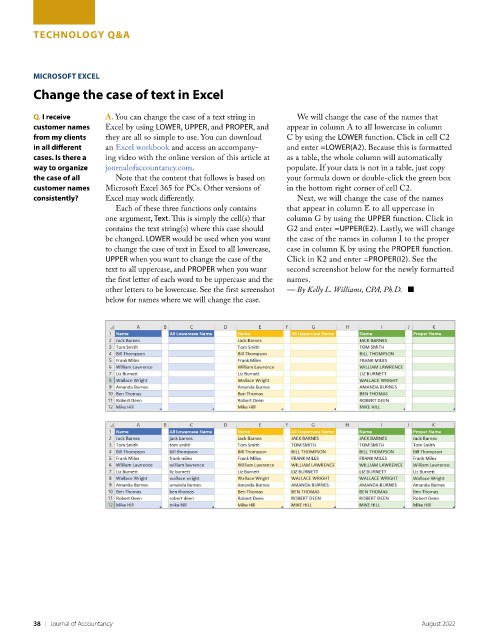
         Q. I receive      A. You can change the case of a text string in   We will change the case of the names that
         customer names    Excel by using LOWER, UPPER, and PROPER, and   appear in column A to all lowercase in column
         from my clients   they are all so simple to use. You can download   C by using the LOWER function. Click in cell C2
         in all different   an Excel workbook and access an accompany-  and enter =LOWER(A2). Because this is formatted
         cases. Is there a   ing video with the online version of this article at   as a table, the whole column will automatically
         way to organize   journalofaccountancy.com.                    populate. If your data is not in a table, just copy
         the case of all      Note that the content that follows is based on   your formula down or double-click the green box
         customer names    Microsoft Excel 365 for PCs. Other versions of   in the bottom right corner of cell C2.
         consistently?     Excel may work differently.                     Next, we will change the case of the names
                              Each of these three functions only contains   that appear in column E to all uppercase in
                           one argument, Text. This is simply the cell(s) that   column G by using the UPPER function. Click in
                           contains the text string(s) where this case should   G2 and enter =UPPER(E2). Lastly, we will change
                           be changed. LOWER would be used when you want   the case of the names in column I to the proper
                           to change the case of text in Excel to all lowercase,   case in column K by using the PROPER function.
                           UPPER when you want to change the case of the   Click in K2 and enter =PROPER(I2). See the
                           text to all uppercase, and PROPER when you want   second screenshot below for the newly formatted
                           the first letter of each word to be uppercase and the   names.
                           other letters to be lowercase. See the first screenshot   — By Kelly L. Williams, CPA, Ph.D.   ■
                           below for names where we will change the case.


         38    |   Journal of Accountancy                                                                 August 2022

