


Page 442 - JoFA_2022
P. 442
formula is =COUNTIFS(D2:D7,"Tax",J2:J7,">5000").   The Criteria_range1 is A3:A27, Criteria1 is
          About the        The resulting value gives us the answer of two;   "Blue", Criteria_range2 is B3:B27, and the
          author           the tax department bills more than $5,000 to   Criteria2 is ">40". The formula is
                           two clients.                              =COUNTIFS(A3:A27,"Blue",B3:B27,">40"). The
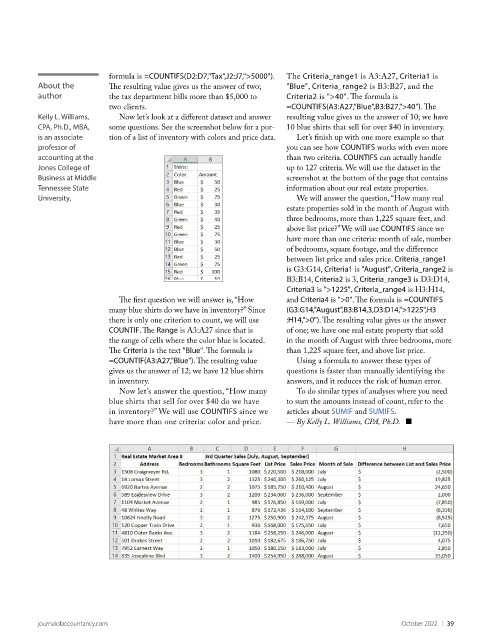
          Kelly L. Williams,   Now let’s look at a different dataset and answer   resulting value gives us the answer of 10; we have
          CPA, Ph.D., MBA,   some questions. See the screenshot below for a por-  10 blue shirts that sell for over $40 in inventory.
          is an associate   tion of a list of inventory with colors and price data.  Let’s finish up with one more example so that
          professor of                                               you can see how COUNTIFS works with even more
          accounting at the                                          than two criteria. COUNTIFS can actually handle
          Jones College of                                           up to 127 criteria. We will use the dataset in the
          Business at Middle                                         screenshot at the bottom of the page that contains
          Tennessee State                                            information about our real estate properties.
          University.                                                  We will answer the question, “How many real
                                                                     estate properties sold in the month of August with
                                                                     three bedrooms, more than 1,225 square feet, and
                                                                     above list price?” We will use COUNTIFS since we
                                                                     have more than one criteria: month of sale, number
                                                                     of bedrooms, square footage, and the difference
                                                                     between list price and sales price. Criteria_range1
                                                                     is G3:G14, Criteria1 is "August", Criteria_range2 is
                                                                     B3:B14, Criteria2 is 3, Criteria_range3 is D3:D14,
                                                                     Criteria3 is ">1225", Criteria_range4 is H3:H14,
                             The first question we will answer is, “How   and Criteria4 is ">0". The formula is =COUNTIFS
                           many blue shirts do we have in inventory?” Since   (G3:G14,"August",B3:B14,3,D3:D14,">1225",H3
                           there is only one criterion to count, we will use   :H14,">0"). The resulting value gives us the answer
                           COUNTIF. The Range is A3:A27 since that is   of one; we have one real estate property that sold
                           the range of cells where the color blue is located.   in the month of August with three bedrooms, more
                           The Criteria is the text "Blue". The formula is   than 1,225 square feet, and above list price.
                           =COUNTIF(A3:A27,"Blue"). The resulting value   Using a formula to answer these types of
                           gives us the answer of 12; we have 12 blue shirts   questions is faster than manually identifying the
                           in inventory.                             answers, and it reduces the risk of human error.
                             Now let’s answer the question, “How many   To do similar types of analyses where you need
                           blue shirts that sell for over $40 do we have   to sum the amounts instead of count, refer to the
                           in inventory?” We will use COUNTIFS since we   articles about SUMIF and SUMIFS.
                           have more than one criteria: color and price.   — By Kelly L. Williams, CPA, Ph.D.   ■


          journalofaccountancy.com                                                              October 2022    |   39

