


Page 441 - JoFA_2022
P. 441
TECHNOLOGY Q&A


         MICROSOFT EXCEL
         Using COUNTIF and COUNTIFS in Excel


         Q. I am trying to   A. This type of analysis can easily be done using   expression that can be found in the defined range.
         do some analysis   COUNTIF and COUNTIFS. COUNTIF is used to count   In our example, the Range is D2:D7 since that
         regarding how    items based on one criterion, while COUNTIFS   is the range of cells where our department names
         many clients     is used to count items based on multiple criteria.   are located. The Criteria is the text "Tax". The
         each of our      Other types of inquiries that these two functions   formula is =COUNTIF(D2:D7,"Tax"). The resulting
         departments      could answer are “How many students received an   value gives us the answer of three; the tax depart-
         serviced and     A in the class?,” “How many employees’ salaries   ment services three clients.
         how many of      are at least $60,000?,” “How many participants are   Next, let’s answer the question, “How many
         those clients    60 years or older?,” or “How many of the shirts   clients did the tax department bill more than
         were billed      we have in inventory are blue?” I have created a   $5,000?,” using the same dataset as our previous
         over a certain   workbook with examples of using COUNTIF and   example. To answer this question, we will use the
         amount. I have   COUNTIFS. You can download an Excel workbook   function COUNTIFS because we will need Excel to
         our department/  and access a video demonstration that accompany   do a count based on two criteria: that the depart-
         client           this article at journalofaccountancy.com.   ment is tax and the amount billed to the client is
         information in     Note that the content that follows is based on   greater than $5,000.
         Excel. Is there an   Microsoft Excel 365 for PCs. Other versions of   With COUNTIFS, there are two arguments to
         easy way to do   Excel may work differently.               define for each criterion. You could use COUNTIFS
         this?              Let’s look at some examples of how to use   if you only had one criterion, and then you would
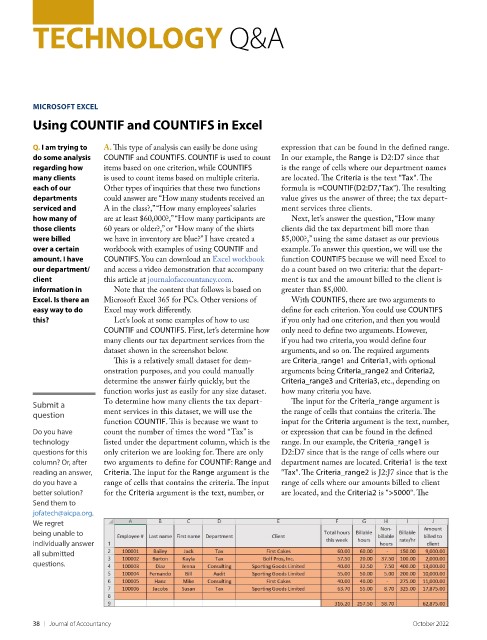
                          COUNTIF and COUNTIFS. First, let’s determine how   only need to define two arguments. However,
                          many clients our tax department services from the   if you had two criteria, you would define four
                          dataset shown in the screenshot below.    arguments, and so on. The required arguments
                            This is a relatively small dataset for dem-  are Criteria_range1 and Criteria1, with optional
                          onstration purposes, and you could manually   arguments being Criteria_range2 and Criteria2,
                          determine the answer fairly quickly, but the   Criteria_range3 and Criteria3, etc., depending on
                          function works just as easily for any size dataset.   how many criteria you have.
         Submit a         To determine how many clients the tax depart-  The input for the Criteria_range argument is
         question         ment services in this dataset, we will use the   the range of cells that contains the criteria. The
                          function COUNTIF. This is because we want to   input for the Criteria argument is the text, number,
         Do you have      count the number of times the word “Tax” is   or expression that can be found in the defined
         technology       listed under the department column, which is the   range. In our example, the Criteria_range1 is
         questions for this   only criterion we are looking for. There are only   D2:D7 since that is the range of cells where our
         column? Or, after   two arguments to define for COUNTIF: Range and   department names are located. Criteria1 is the text
         reading an answer,   Criteria. The input for the Range argument is the   "Tax". The Criteria_range2 is J2:J7 since that is the
         do you have a    range of cells that contains the criteria. The input   range of cells where our amounts billed to client
         better solution?   for the Criteria argument is the text, number, or   are located, and the Criteria2 is ">5000". The
         Send them to
         jofatech@aicpa.org.
         We regret
         being unable to
         individually answer
         all submitted
         questions.


         38    |   Journal of Accountancy                                                          October 2022

