


Page 106 - Graphic Mac User Guide
P. 106
    Modify Paths
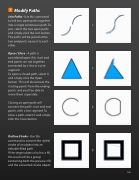
Join Paths - Use this command to link two open paths together into a single continuous path. To join, select the two open paths and simply click the Join button. The paths will be joined at the two endpoints nearest to each other.
Open / Close - A path is considered open if its start and end points are not together, connected by a line or curve segment.
To open a closed path, select it and simply click the Open button. This will disconnect the starting points from the ending points and you’ll be able to move them separately.
Closing an open path will connect the path’s start and end points with a line segment.To close a path, select it and simply click the Close button.
Outline Stroke - Use this command to convert the styled stroke of an object into an editable  lled path.
If the target object also has a  ll, the result will be a group containing both the previous  ll and the converted stroke object.
                   106


