


Page 107 - Graphic Mac User Guide
P. 107
  Compound Path
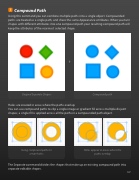
Using this command you can combine multiple paths into a single object. Compounded paths are treated as a single path, and share the same Appearance attributes. When you turn shapes with different attributes into one compound path your resulting compound path will keep the attributes of the rearmost selected shape.
       Original Separate Shapes Compound path
Holes are created in areas where the paths overlap.
You can use compound paths to clip a single image or gradient  ll across multiple disjoint shapes; a single  ll is applied across all the paths in a compounded path object.
      Using compound paths to Holes appear in areas where the create holes paths overlap
The Separate command divides the shapes that make up an existing compound path into separate editable shapes.
 107


