


Page 108 - Graphic Mac User Guide
P. 108
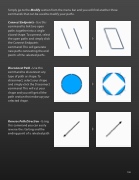
 Simply go to the Modify section from the menu bar and you will  nd another three commands that can be used to modify your paths.
Connect Endpoints - Use this command to link two open paths together into a single closed shape. To connect, select the open paths and simply click the Connect Endpoints command. This will generate new paths connecting the end points of the selected paths.
Disconnect Path - Use this command to disconnect any type of path or shape. To disconnect, select your shape and simply click the Disconnect command. This will cut your shape and you will get all the path section that make up your selected shape.
Reverse Path Direction - Using this command you can easily reverse the starting and the ending point of a selected path
                108


