


Page 110 - Graphic Mac User Guide
P. 110
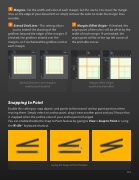
  Margins - Set the width and color of each margin. Set the size to 0 to move the margin lines on the edge of your document or simply remove the color to make the margin lines invisible.
  Extend Grid Lines - This setting allows you to extend the drawing of the
gridlines beyond the edges of the margins. If checked, the gridlines extend over the margins, or if unchecked the gridlines end at each margin.
Extend Grid Lines over margins enabled and disabled
Snapping to Point
Margins Offset Origin - If checked, the origin point of the rulers will be offset by the width of each margin. If unchecked, the origin point will be at the top left corner of the printable canvas.
Margin Offset Origin enabled and disabled
      Enable this setting to snap objects and points to the nearest anchor point position when moving them. Simply select an anchor point, drag it near another point and you’ll know that it snapped when the outline color of your anchor point changed.
You can enable/disable the Snap to Point feature by going to View > Snap to Point or using the ⌘-Alt-’ keyboard shortcut.
    Using the Snap to Point feature
 110


