


Page 111 - Graphic Mac User Guide
P. 111
 Working with Guides
Guides are straight, vertical or horizontal lines that make it easier for you to align text and objects. Guides do not print.
Adding Guides
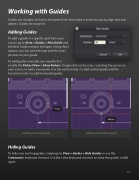
To add a guide in a speci c spot from your canvas go to View > Guides > New Guide and the New Guide window will open. Using these options you can pick the type and the exact position of your guide.
To add guides manually you need to  rst
enable the Rulers (View > Show Rulers). Simply click on the rulers and drag the cursor on your canvas to add a new guide. Use the vertical rulers to add vertical guide and the horizontal rulers to add horizontal guides.
Adding a vertical guide Adding a horizontal guide
Hiding Guides
To hide your existing guides simply go to View > Guides > Hide Guides or use the Command-; keyboard shortcut. Use the same keyboard shortcut to make the guides visible again.
     111


