


Page 113 - Graphic Mac User Guide
P. 113
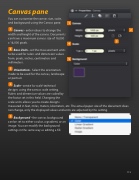
  Canvas pane
You can customize the canvas size, scale, and background using the Canvas pane.
Canvas - enter values to change the width and height of the canvas. Documents can have a maximum canvas size of 16,000 x 16,000 pixels.
Base Units - set the measurement units to be used for rulers and dimension values from: pixels, inches, centimeters and millimeters.
Orientation - Select the orientation mode to be used for the canvas, landscape or portrait.
Scale - create ‘to-scale’ technical
designs using the canvas scale setting.
Rulers and dimension values are scaled by
the factor set in this  eld. Changing the
scale units allows you to create designs
measured in feet, miles, meters, kilometers, etc. The actual paper size of the document does not change, only the displayed values and units are adjusted by this setting.
Background - the canvas background can be set to either a color, a gradient, or an image. You can modify the background settings in the same way as editing a  ll.
            113


