


Page 115 - Graphic Mac User Guide
P. 115
  Preferences
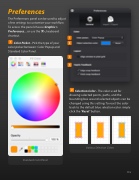
The Preferences panel can be used to adjust a few settings to customize your work ow. To access the panel choose Graphic > Preferences... or use the ⌘-, keyboard shortcut.
Color Picker - Pick the type of your color picker between: Color Popup and Standard Color Panel.
Standard Color Panel
Selection Color - The color used for drawing selected points, paths, and the bounding box around selected objects can be changed using this setting. To reset the color back to the default blue selection color simply click the ‘Reset’ button.
Various Selection Colors
            115


