


Page 114 - Graphic Mac User Guide
P. 114
  Resizing Canvas
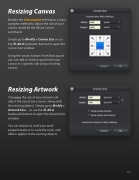
Besides the Canvas pane technique, a more complex method to adjust the size of your canvas would be the Resize Canvas command.
Simply go to Modify > Canvas Size or use the ⌘-Alt-K keyboard shortcut to open the
Canvas Size window.
Using the arrows buttons from that square you can add or remove space from your canvas in a speci c side of your existing canvas.
Resizing Artwork
Changing the size of your artwork will adjust the size of your canvas along with the existing objects. Simply go to Modify > Artwork Size... or use the ⌘-Alt-A keyboard shortcut to open the Artwork Size window.
You can choose to scale your work proportionally or to scale the styles and effects applies to the existing objects.
  114


