


Page 30 - Graphic Mac User Guide
P. 30
 Shapes Library Panel
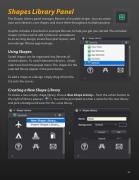
The Shapes Library panel manages libraries of reusable shapes. You can create your own libraries, save shapes, and reuse them throughout multiple projects.
Graphic includes a few built-in example libraries to help you get you started. The included shapes can be used to add symbols or annotations
to an existing design, create  oor plan layouts, and
even design iPhone app mockups.
Using Shapes
Saved shapes can be organized into libraries of related objects. To switch between libraries, simply select one from the popup menu. The shapes for the selected library appear in the pane below.
To add a shape to a design simply drag it from the list onto the canvas.
Creating a New Shape Library
To create a new empty shape library, choose New Shape Library... from the action button to
the right of library popup ( ). You will be prompted to enter a name for the new library and pick a background color for this same library.
          30


