


Page 32 - Graphic Mac User Guide
P. 32
  Styles Panel
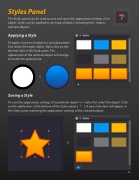
The Styles panel can be used to save and reuse the appearance settings of an object. Styles can be applied to any type of object, including lines, shapes, and text objects.
Applying a Style
To apply a style to an object in your document,  rst select the target object. Next, click on the desired style in the Styles pane. The appearance of the selected object will change to match the picked style.
       Saving a Style
To save the appearance settings of a particular object as a style,  rst select the object. Click on the add button at the bottom of the Styles panel ( ). A new style item will appear in the Styles pane matching the appearance settings of the selected object.
       32


